Overview
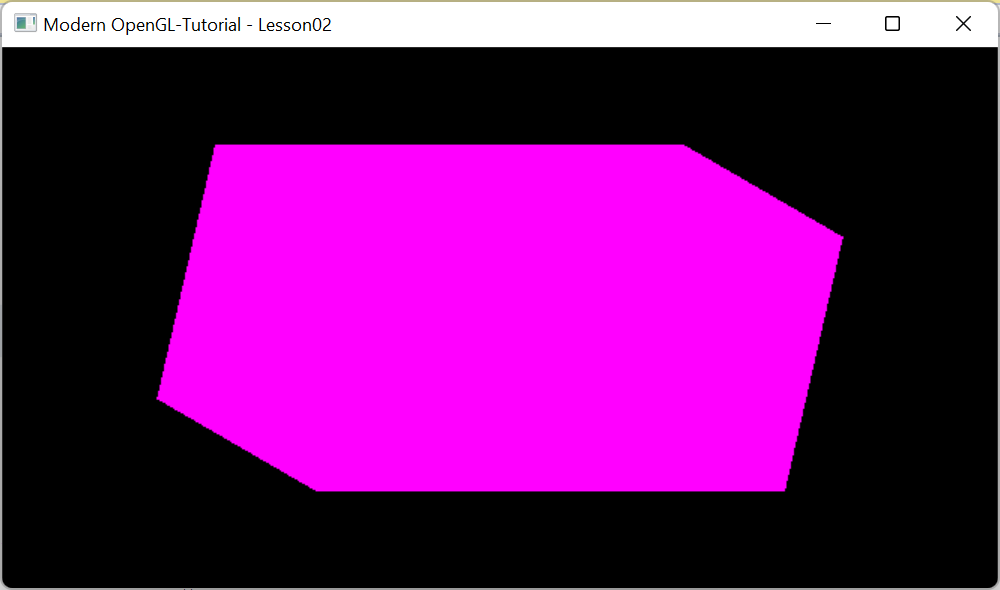
In this post we shall deep dive and understand implementing a mesh and geometric object for cube shape. We will try to draw a single colored cube as shown at the bottom and rotate it along the three axes. The cube looks elongated because aspect ratio is not applied. Details
System class diagram
Every 3D object such as SingleCoredCube derives from BaseGeometry class. It overrides mesh with an instance of CubeMesh to generate geometry.
Cube Geometry
A cube has 8 vertices (0,1,2,3,4,5,6,7) and 6 faces (top, bottom, right, left, back, front), with each face made up of 2 triangles. Its center of the origin is at (0,0,0).

CubeMesh
CubeMesh class generates geometry for the cube shape. As we learnt previously, GPU expects data in the form of vertices of the triangles. Hence the cube is divided into 12 triangles. The geometry consists of geometry data for each of the three vertices of the triangle. In other words, the geometry data consists of 36 vertices.
The geometry data for each vertex consists of
- X, Y, Z coordinate (mandatory)
- Color (optional)
- Normal vector (optional)
- Texture coordinates (optional)
How this data is packaged depends on if data is sent as indexed or non indexed format.
In non indexed format, all the 4 pieces of data is packaged and sent for all the 36 vertices.
In indexed format, all the 4 pieces of data is packaged and sent for only the 8 vertices.
In addition, an array consisting of indices of the 36 vertices are also sent.
This will be more clear in the discussion below.
The CubeMesh class derives from IGeometryMeshIndexed interface.

It overrides GenerateVerticesData() method to generate 36 vertices for the 12 triangles, 2 from each of the 6 faces as discussed above. Only Position attribute of the vertex containing X,Y, Z coordinates is stored internally as a vector.
Members
| Name | Description |
|---|---|
| clrs | Contains individual colors for the six faces. Each color is represented as RGB format with values varying from 0 to 1. |
| faces | Contains vertices. 3 vertices for each triangle. 2 triangles for each face. 6 faces for entire cube. |
| normals | Contains individual normal for the six faces. Each normal has X,Y,Z format with values varying from -1 to 1. |
| texturemap | Contains individual texture coordinate for the six faces. Each texture coordinate has X,Y format with values varying from 0 to 1. |
| vertices | Contains 8 vertices of the cube. Each vertex has X,Y,Z format with values varying from -1 to 1. |
Methods
| Name | Description |
|---|---|
| GenerateVerticesData | This method generates vertex data for the GPU to render the geometrical shape. This method is called if the data is sent in non indexed mode. The parameter att specifies the 4 attributes in the form of their enums ORed together. The enums are defined in BaseGeometry class. The data is stored in the parameter vaoutil by invoking its corresponding method to update the data. For example, for the enum POS, AddPosition() method is called etc. |
| GenerateVerticesDataIndexed | Same as GenerateVerticesData() except this method is called if the data is sent in indexed mode. |
| GenerateIndicesData | This method is called if the data is sent in indexed mode. It sends an array consisting of indices of the 36 vertices. |
| updateColors | Updates the clrs with the array in the parameter clrs. |
| updateNormals | Updates the normals with the array in the parameter normals. |
| updateTextureMap | Updates the texturemap with the array in the parameter texturemap. |
SingleColoredCube
SingleColoredCube is derived from BaseGeometry class. It assembles vertex data generated by mesh in VBO and EBO buffers. Later sent to GPU using shader programs.

Members
| Name | Description |
|---|---|
| color | Contains the color of the cube |
Methods
| Name | Description |
|---|---|
| Init | This method overrides the base class Init method. It creates the mesh object. Generates the vertices data in non indexed mode and later sets them up in VBO buffers of the GPU. |
| UpdateUniforms | This method overrides the base class UpdateUniforms method. The base class method updates the "transform" matrix uniform by calling GetTransformationMatrix method. It updates the uniform "color" containing the value from color to the shader. |
| vertexShaderSource | This method overrides the base class vertexShaderSource method. It returns the vertex shader code to render the cube object. |
| fragmentShaderSource | This method overrides the base class fragmentShaderSource method. It returns the fragment shader code to render the cube object. |
Output
No comments:
Post a Comment